Looking for your apps? Click the account icon in the upper right corner of the page.

Prepare the tripod

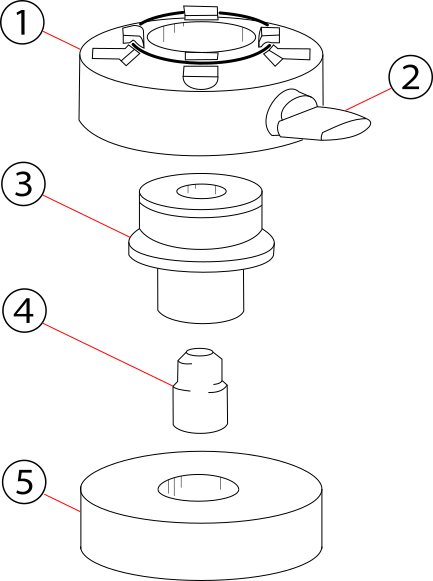
Figure: Quick release parts
  1. Scanner plate
  2. Fixation screw
  3. Center spindle
  4. Spindle screw
  5. Tripod plate
  1. Extend the tripod legs and place the tripod on a stable surface at a convenient height. Ensure that all legs of the tripod are secure.
  2. Your tripod might be equipped with one or more set screws in the platform. Ensure that the set screws are recessed below the platform. They must not stick up out of the surface.
  3. Place the tripod plate over the center screw of the tripod.
  4. Ensure that the spindle screw is firmly screwed into the narrow side of the center spindle.
  5. Screw the center spindle firmly onto the tripod.

myTopcon NOW! support

Take your Topcon experience to the next level with myTopcon NOW! This platform is a self-service tool for your desktop or mobile device. 

Product manuals
paper icon
Communications
phone icon
E-learning
hat icon
Quick start guides
support icon
Firmware & software updates
cloud icon
Troubleshooting
webinars icon





