
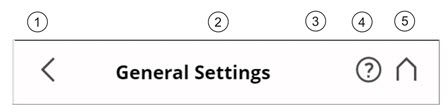
- Back - Returns you to the previous screen.
- Screen Name - Name of the screen that is currently shown.
- Errors and Warnings - Only appears, if warning or errors are present. Tap this to open a screen that shows the details of the existing warnings or errors. Service.
- Help - Opens the online help of the currently active screen, providing access to the user manual. Online help and notifications
- Home - Returns you to the home screen. Frequently used buttons.
Previous:
Manage
Next:
Frequently used buttons
myTopcon NOW! support
Take your Topcon experience to the next level with myTopcon NOW! This platform is a self-service tool for your desktop or mobile device.





