Looking for your apps? Click the account icon in the upper right corner of the page.

Parameter Reset

There are two methods to do a parameter reset. You can use the Power button or the web UI.
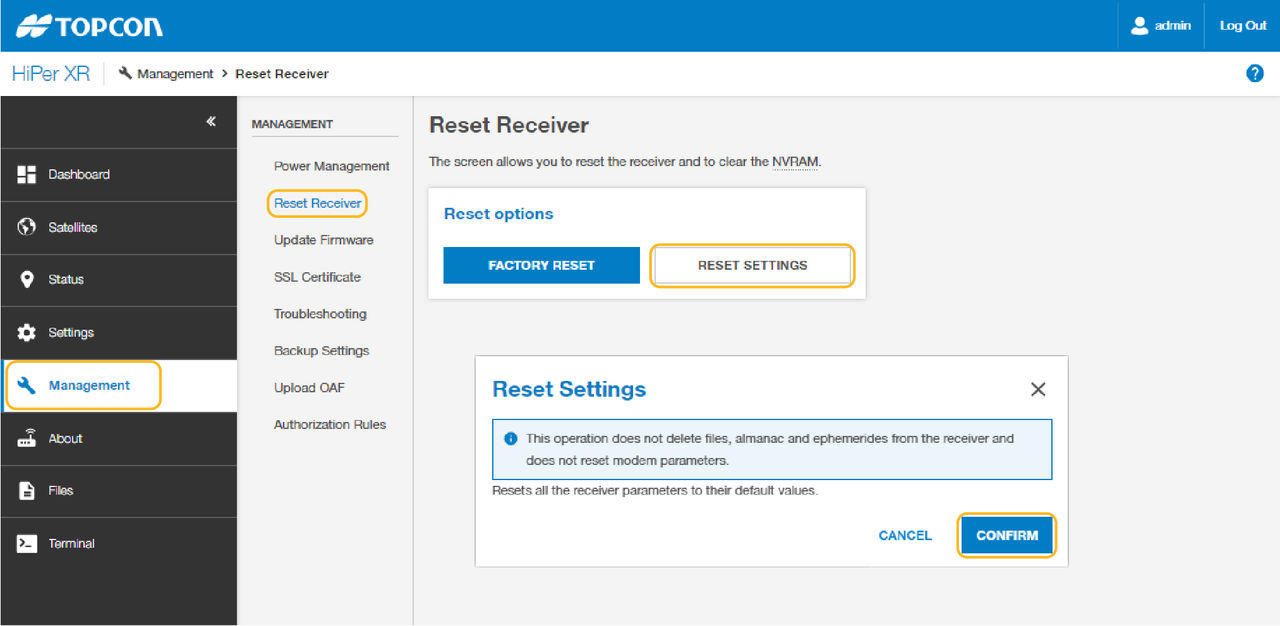
To reset the HiPer XR GNSS receiver parameters from the on-board web UI:

  1. Connect the HiPer XR GNSS receiver to a field controller or computer and open the on-board web UI.
  2. Select ManagementReset Receiver to show the available options.
  3. Select Reset Settings.
    ADDITIONAL INFORMATION:
    A dialog opens to show information about the parameter reset.
  4. Select Confirm to continue with the settings reset.
    ADDITIONAL INFORMATION:
    Figure: Reset parameters

myTopcon NOW! support

Take your Topcon experience to the next level with myTopcon NOW! This platform is a self-service tool for your desktop or mobile device. 

Product manuals
paper icon
Communications
phone icon
E-learning
hat icon
Quick start guides
support icon
Firmware & software updates
cloud icon
Troubleshooting
webinars icon