
When the MC Max Dozer System is calibrated, the Elevation Control button shows cut/fill readings and the cut/fill offsets for the elevation of the blade.
The Elevation Control button also indicates the status of the connected sensor with graphics, informational messages, and colors. Refer to 3D-MC Software v15 User Manual for Constructions Systems P/N 1013515-01 on myTopcon NOW!
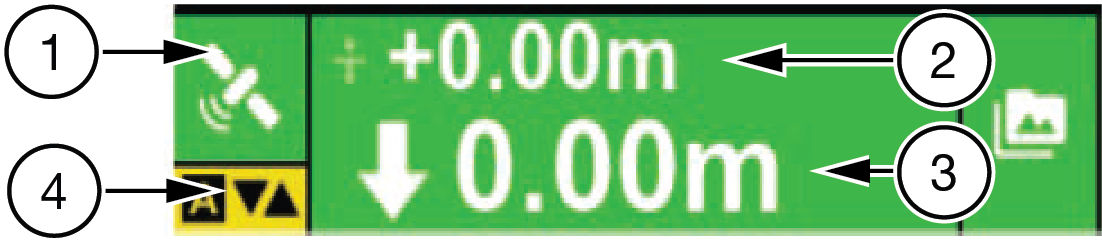
| 1 | Elevation sensor type and status | Shows sensor status when the green indication sensor is connected, the red icon indicates that the sensor is on standby or not connected, and the radio icon flashes (3-10 seconds) to indicate weak radio signal. |
| 2 | Set point | Shows the current set point or vertical offset to the design surface. Use set points to maintain an offset to the design surface such as trimming overbuilt areas to grade or managing lifts for fill material. |
| 3 | Cut/fill | In 3D control, shows the current cut/fill reading or distance from finish grade. The number continuously updates according to the elevation difference between the cutting edge and the design surface. |
| 4 | AUTO indicator | AUTO with yellow background indicates that automatic control is engaged. If AUTO shows in red letters with a line through it, the elevation is outside of parameters and the feature is unavailable. |
| Elevation Control button background | Background color indicates sensor status
|
Previous:
View 3D-MC version
myTopcon NOW! support
Take your Topcon experience to the next level with myTopcon NOW! This platform is a self-service tool for your desktop or mobile device.





