
- Install the dozer cable seal bracket kit (P/N 1002487) in the back of the cab behind the operator’s seat.ADDITIONAL INFORMATION:Refer to the instructions to drill and install the cable seat bracket kit included with the cable seal kit.
- If the machine does not have pre-drilled holes, find the area shown below to install the cable seal.ADDITIONAL INFORMATION:Some machines will have pre-drilled holes to mount the cable seal on the cab floor behind the seat.
Figure: Rear cable seal bracket 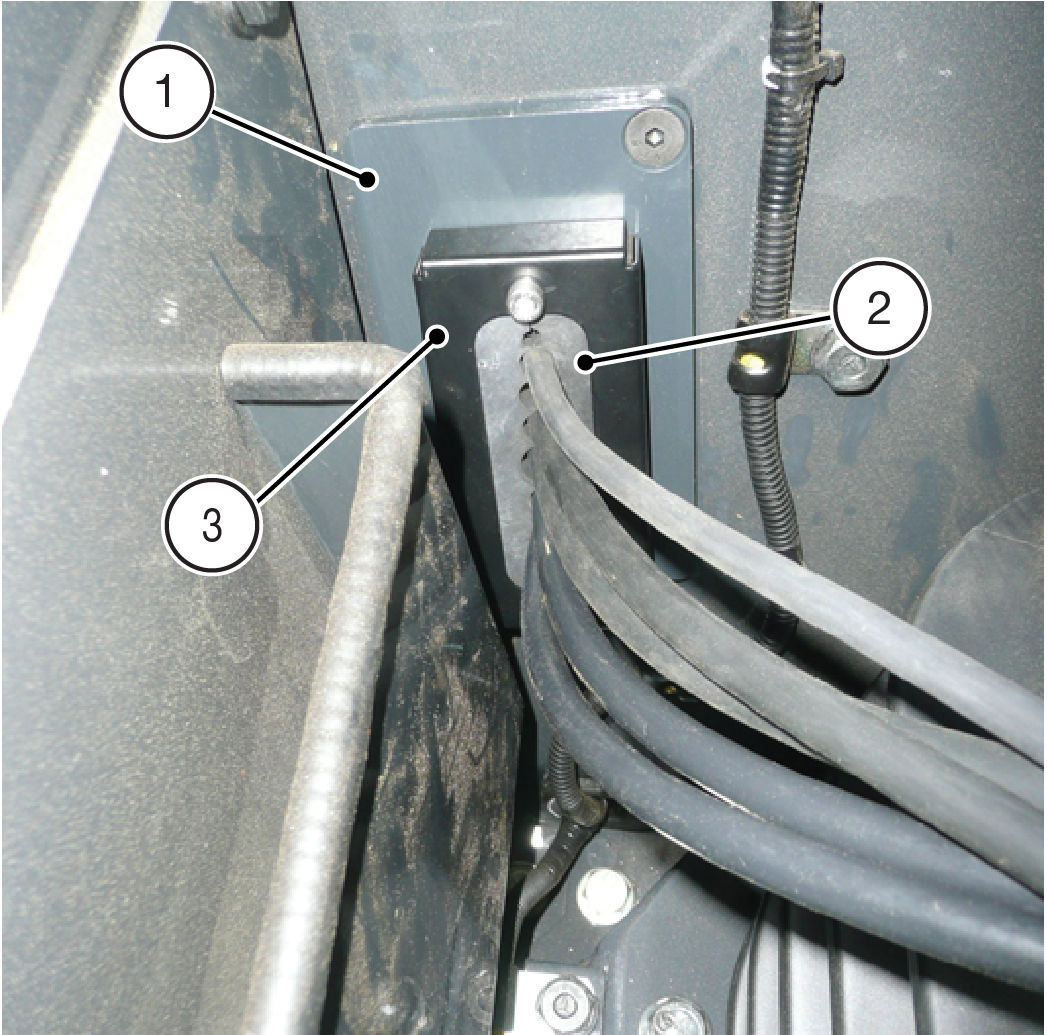
- Base Bracket
- Seal
- Seal Retainer
- Use the cable access seal (2) as a template to outline the area to be removed.
- Use a drill, hole saw, and grinder to remove the marked section.
- Attach the base bracket (1) to the machine.
- Install the seal (2) in the seal retainer (1).
- Attach the seal retainer (3).
- Run the TS-i4 IMU sensors cable, GNSS cable, diversity antenna cables (and if applicable), and the radio antenna cables under the cab and through the cable access seal later in the installation process.
Previous:
Cable access seal Installation
myTopcon NOW! support
Take your Topcon experience to the next level with myTopcon NOW! This platform is a self-service tool for your desktop or mobile device.





