
- Enter the for the network connection service provider.
- Select
 to start the network connection.
 - Select the applicable Mount Point from the drop-down list.ADDITIONAL INFORMATION:
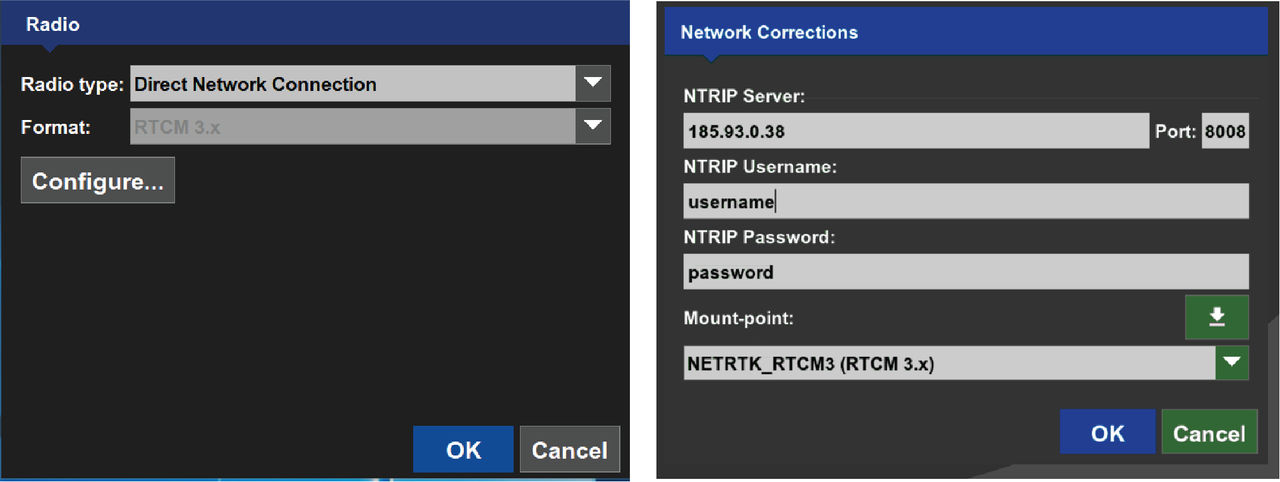
- Select OK to save the radio configuration settings and open to the Radio screen.ADDITIONAL INFORMATION:Note:
- Installation of 3D-MC v15 software overwrites the radio settings for UHF Radio, FH-915 Radio and the Direct Network Connection.
- Users must configure any UHF Channel changes made in the MC-X Machine Control Gateway.
Previous:
FH915 (internal or UR-1)
Next:
Support desk
myTopcon NOW! support
Take your Topcon experience to the next level with myTopcon NOW! This platform is a self-service tool for your desktop or mobile device.





