
The display monitors fan and shaft speeds. It shows configurable alarms for abnormal thresholds, with options to pause alerts temporarily and adjust settings from the Operator menu.
The display can monitor either one or two fans and one or two metering shafts. This is controlled by the drill configuration. A fan alarm has a low-speed and a high-speed configurable threshold. A metering shaft alarm has a low-speed alarm threshold with a configurable time delay before activation. You can configure the time delays from the Operator menu. If a fan and/or shaft speed goes above (or below) the thresholds, an alarm window replaces the tramline window and flashes red, then the display makes five alert sounds. Select  to temporarily pause an alarm. The alarm display restarts after 30 seconds until the fan or shaft speed is back in the correct range.
to temporarily pause an alarm. The alarm display restarts after 30 seconds until the fan or shaft speed is back in the correct range.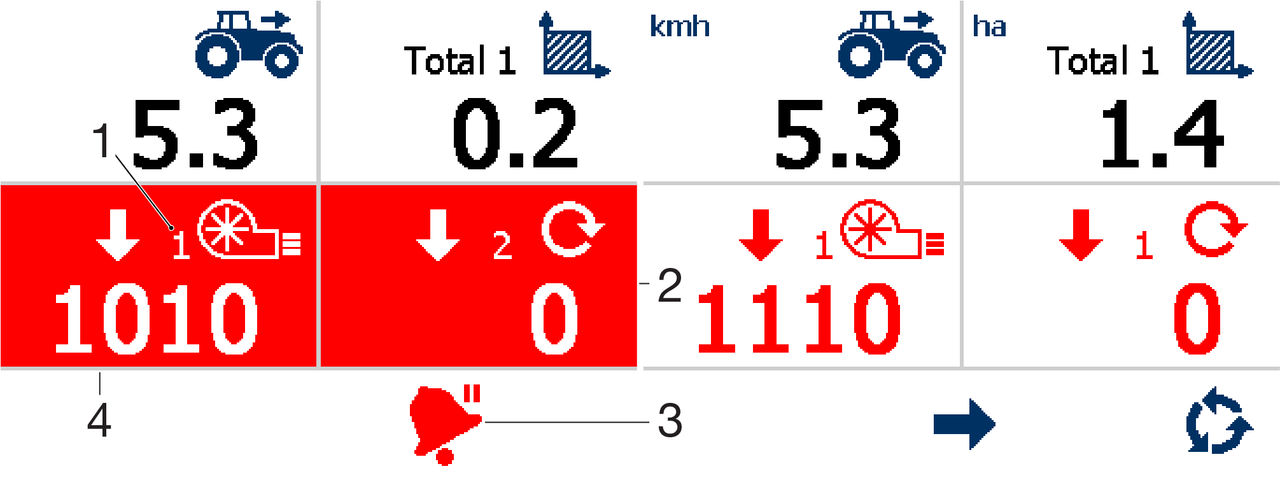
- Fan number
- Low shaft speed alarm
- Pause alarm
- Low fan speed alarm
Note:
Select repeatedly to pause multiple alarms, (that is, if more than one alarm is active at the same time).
repeatedly to pause multiple alarms, (that is, if more than one alarm is active at the same time).Note:
All alarms are disabled when the forward speed is below 0.3 mph (0.5 kmh).
Previous:
Enable/Disable forward speed alarm
Next:
Fan speed RPM display
myTopcon NOW! support
Take your Topcon experience to the next level with myTopcon NOW! This platform is a self-service tool for your desktop or mobile device.


