
You can enable or disable Level1 and Level2 alarms from the Alarms menu.
Both level alarms are enabled by default.
- Open the Alarms menu.
- Select Level1 Alarm or Level2 Alarm.
- Set the alarm to ON or OFF. ADDITIONAL INFORMATION:
Figure: Level alarms 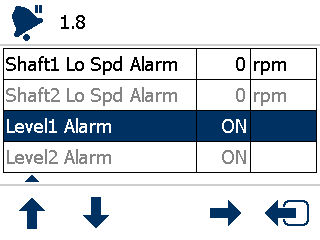
Previous:
Level sensor setup
Next:
Forward speed alarm
myTopcon NOW! support
Take your Topcon experience to the next level with myTopcon NOW! This platform is a self-service tool for your desktop or mobile device.


