
Learn how to enable or disable tramlining from the Technician menu and adjust settings with the arrow controls.
Tramlining is enabled by default. If necessary, you can disable it. When disabled, it does not show on the main operation screen.
- Select .
- Use the arrows to enable or disable tramlining.ADDITIONAL INFORMATION:
Figure: Enable/disable tramlining 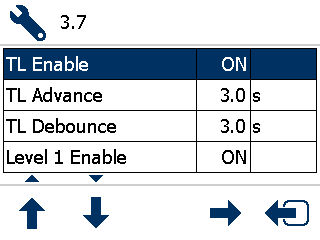
Previous:
Tramlining setup
Next:
Tramline outputs
myTopcon NOW! support
Take your Topcon experience to the next level with myTopcon NOW! This platform is a self-service tool for your desktop or mobile device.


