
Load UHF radio channels
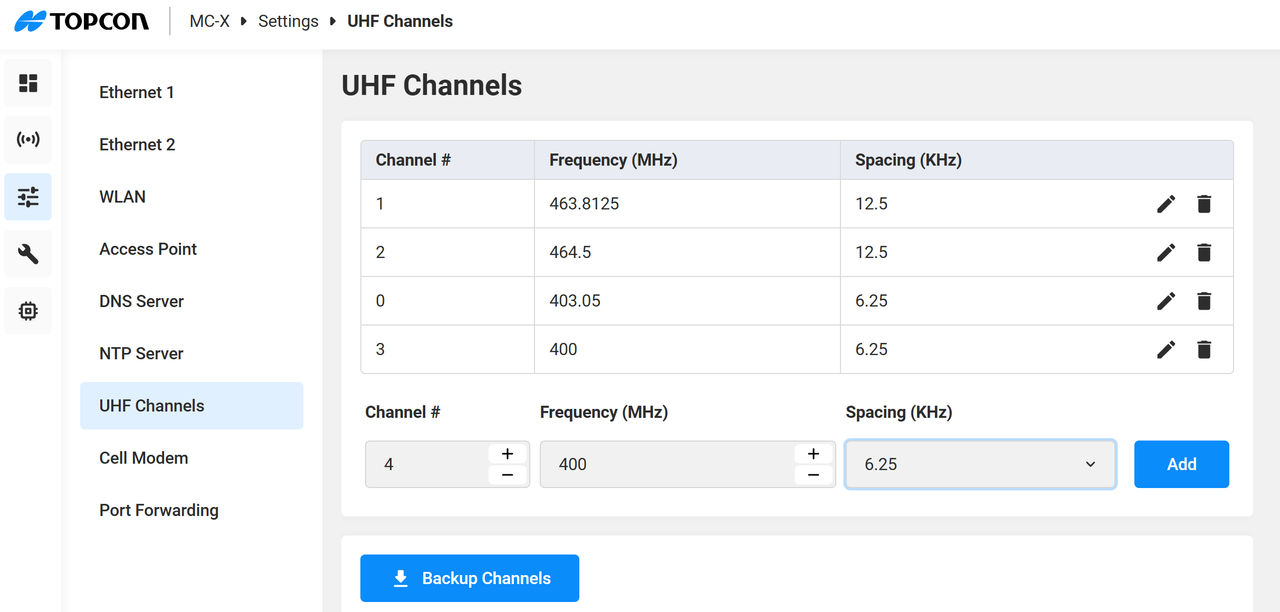
You can manually add new UHF radio channels to a machine setup. If you use the same channels across a group of machines, you can create a table of channels and upload that file to use on multiple machine setups.
To manually add a channel:
- Open MCWEB.
- Select .
- Enter the applicable values in the Channel #, Frequency (MHz), and Spacing (KHz) fields.
- Select Add.ADDITIONAL INFORMATION:
- ADDITIONAL INFORMATION: To upload a UHF channel table to another machine:
- Select Browse.
- Select the channel table file.
- Select Backup to save the table in a Javascript format.
- Select Restore to upload the .JSON file of channels to another machine setup.
Previous:
Update TS-i4 firmware
Next:
System logging
myTopcon NOW! support
Take your Topcon experience to the next level with myTopcon NOW! This platform is a self-service tool for your desktop or mobile device.





