
Looking for your apps? Click the account icon in the upper right corner of the page.

Verify MC-X license

Verify MC-X license

After you install a new MC-X License, make sure that the license is valid and that all applicable license options show.
  1. Open MCWEB.
  2. Select MaintenanceLicenseStatus.
    ADDITIONAL INFORMATION:
    Figure: MC-X license status
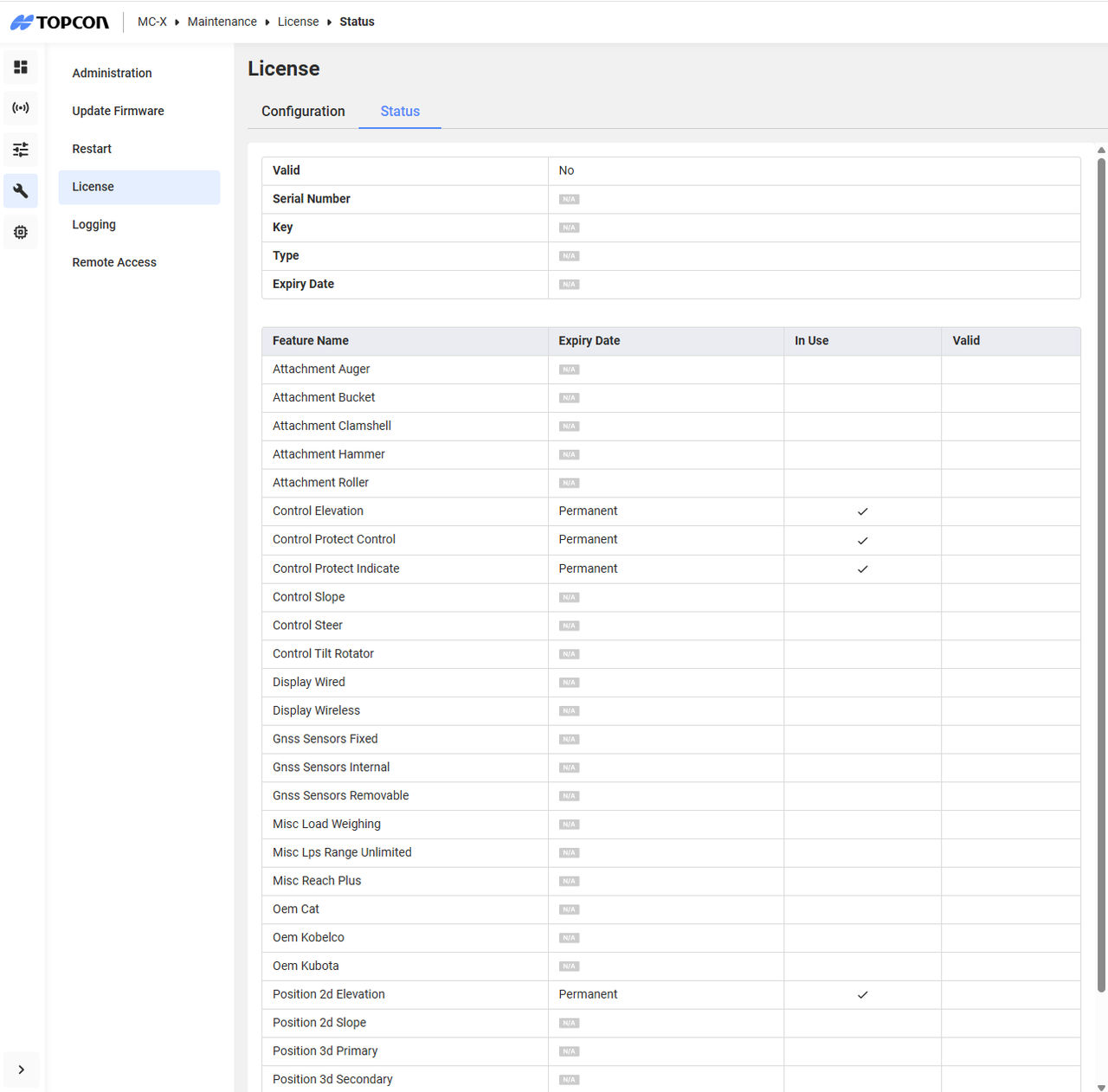
  3. Make sure that the MC-X License is valid on the Status tab.
    ADDITIONAL INFORMATION:
    Yes must show on the Valid row. The applicable MC-X license features must show.

myTopcon NOW! support

Take your Topcon experience to the next level with myTopcon NOW! This platform is a self-service tool for your desktop or mobile device. 

Product manuals
paper icon
Communications
phone icon
E-learning
hat icon
Quick start guides
support icon
Firmware & software updates
cloud icon
Troubleshooting
webinars icon




