
Looking for your apps? Click the account icon in the upper right corner of the page.

Scanner details

ManageGeneral SettingsScanner Details

You can specify a scanner name and the owner. By default the scanner name is the serial number of the scanner.
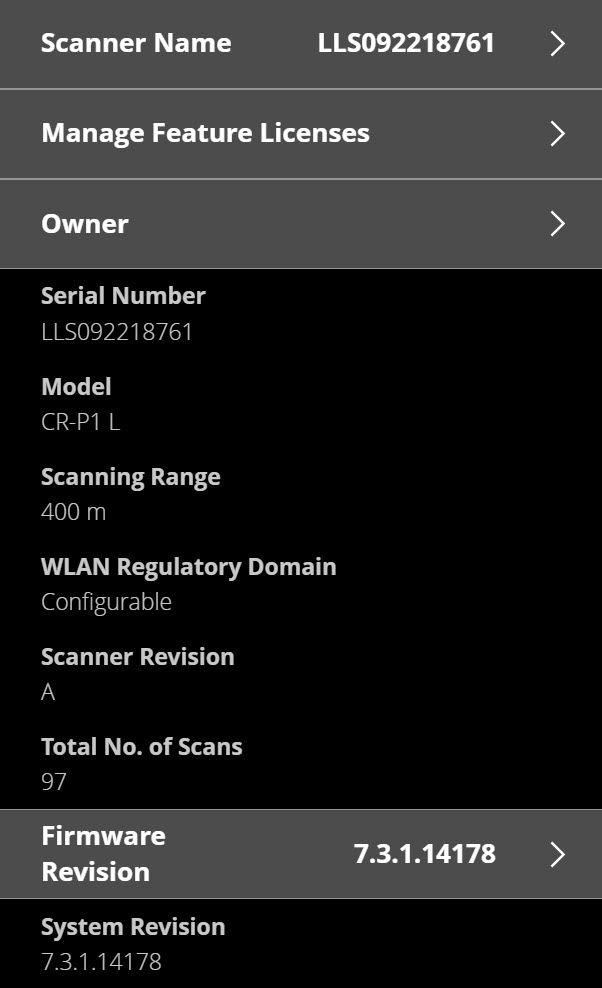
Figure: Scanner details
Scanner name - Tap to change the name of the scanner.
Manage Feature Licenses - Tap to add and manage additional feature licenses. Contact your Topcon sales representative for further information.
Owner - Tap to enter the name of the company or person, who owns the scanner.


myTopcon NOW! support

Take your Topcon experience to the next level with myTopcon NOW! This platform is a self-service tool for your desktop or mobile device. 

Product manuals
paper icon
Communications
phone icon
E-learning
hat icon
Quick start guides
support icon
Firmware & software updates
cloud icon
Troubleshooting
webinars icon



