
Looking for your apps? Click the account icon in the upper right corner of the page.

Sensors

ManageSensorsTemperature
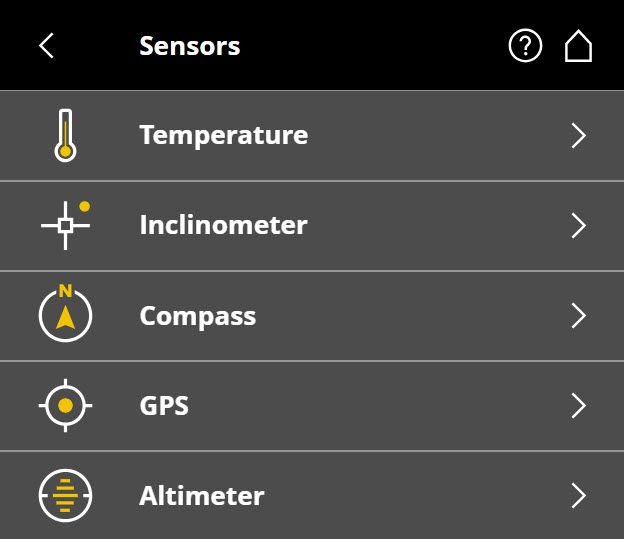
Figure: Sensors
Temperature - Tap to view the current scanner temperature and to switch the scanner's fan on or off. Temperature sensors.
Inclinometer - Tap to level the scanner. Inclinometer (Dual-Axis Compensator).
Compass - Tap to view the orientation of the scanner. Compass.
GPS - Tap to view details regarding the current GPS position and accuracy. GPS.
Altimeter - Tap to view the currently measured altitude of the scanner’s position and to sync the altimeter with a reference height. Altimeter.


Temperature sensors

The scanner has several integrated temperature sensors that measure the temperature at different points inside the scanner. This screen shows the temperature of the sensor with the currently most critical value.
If a sensor is outside of the recommended operating temperature, but not yet critical, the temperature display is highlighted in yellow. Scanning is still possible, but we recommend letting the scanner either warm up or cool down until the temperature display is again highlighted in green.
If the temperature is too high or too low, the temperature display is highlighted in red. In that case, scanning is not possible. The scanner shuts down within a few minutes.
Fan cooling switches the scanner's integrated fan on or off.
If the temperature is above the critical limit, ensure that the fan is switched on. If not, switch it on.
Caution:
Switch the fan off in exceptional cases only!
If the fan is switched off for long periods, the scanner can overheat, resulting in an aborted scanning process or causing damage.

Inclinometer (Dual-Axis Compensator)

ManageSensorsInclinometer
Figure: Inclinometer

myTopcon NOW! support

Take your Topcon experience to the next level with myTopcon NOW! This platform is a self-service tool for your desktop or mobile device. 

Product manuals
paper icon
Communications
phone icon
E-learning
hat icon
Quick start guides
support icon
Firmware & software updates
cloud icon
Troubleshooting
webinars icon




