Looking for your apps? Click the account icon in the upper right corner of the page.

Storage management

Caution:
All scans in a project must be saved on the same storage media. Do not switch between Internal and SD card storage during a scan project.

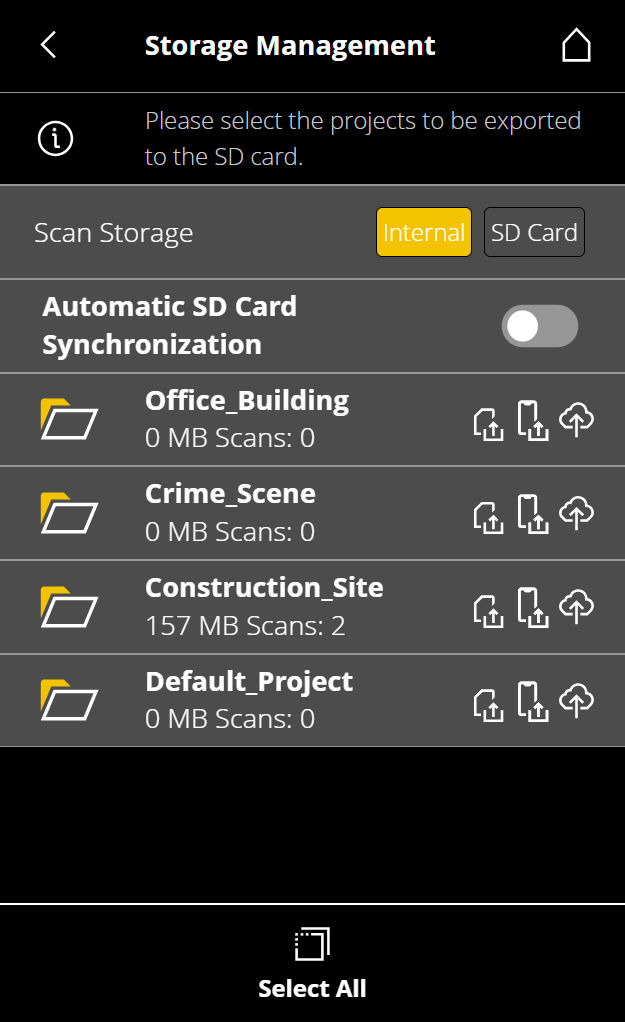
Figure: Storage management
Scan Storage - Choose whether to save the scan data on the internal solid state drive (SSD) or on the removable SD card.
If you select Internal scan storage, you can delete scan projects, or manually export them to the SD card. You can also select Automatic SD Card Synchronization which will mirror the selected project or projects SSD to the SD card.
You can also Delete or Export scan projects from this page.

myTopcon NOW! support

Take your Topcon experience to the next level with myTopcon NOW! This platform is a self-service tool for your desktop or mobile device. 

Product manuals
paper icon
Communications
phone icon
E-learning
hat icon
Quick start guides
support icon
Firmware & software updates
cloud icon
Troubleshooting
webinars icon