
The MC-X controller must contain a valid MC-X license for CTL. When you use the 3D-MC software, examine the valid MC-X license features.
- Start 3D-MC.
- Select the Main Menu icon.
- Select to show the About pop-up.
- Make sure that the MC-X license is valid for all applicable features.ADDITIONAL INFORMATION:
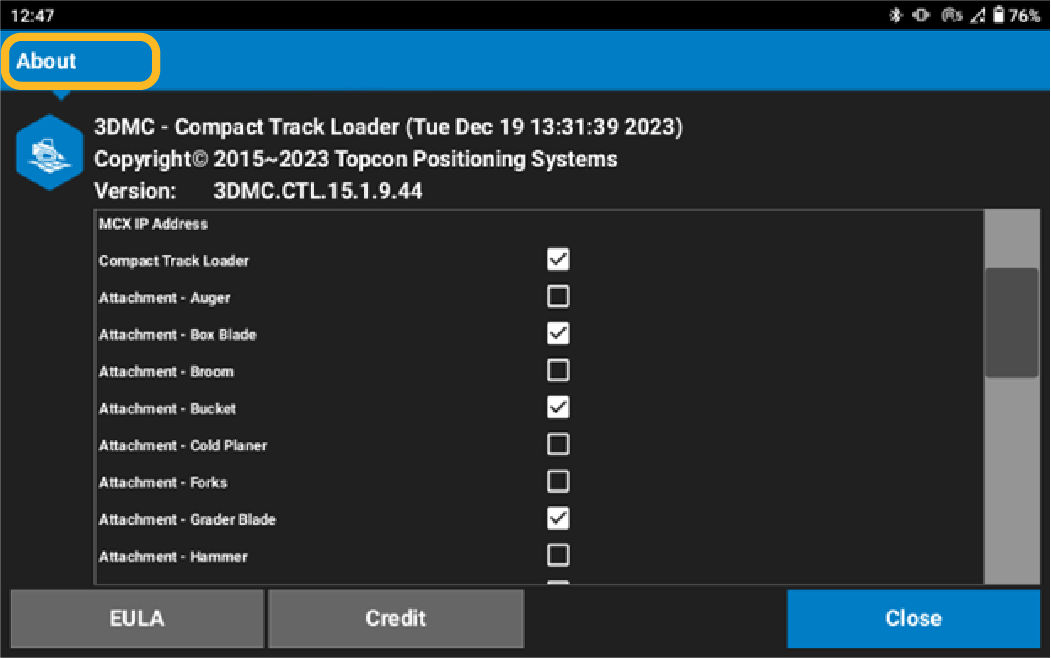 Notice: The MC-X license must be specified for CTL for MC-Mobile CTL functions to operate correctly. Make sure that CTL is also enabled in the About pop-up.
Previous:
Verify MC-X license
myTopcon NOW! support
Take your Topcon experience to the next level with myTopcon NOW! This platform is a self-service tool for your desktop or mobile device.





