
Load UHF radio channels
- Select UHF Channels under the Network menu.
- Select Edit for Channel # to edit.
- Enter the appropriate values and select Add.ADDITIONAL INFORMATION:
Figure: Load UHF radio channels 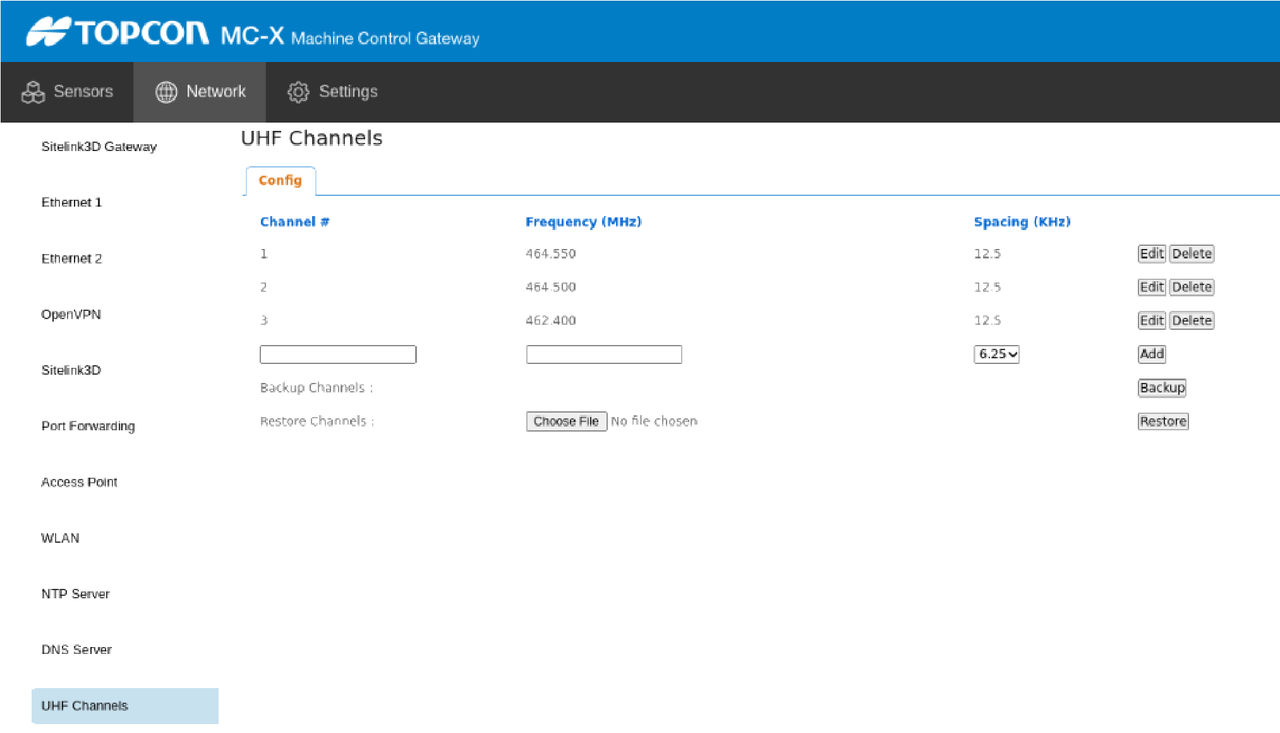 Note: Installation of 3D-MC v15 software will overwrite the radio settings for UHF Radio, FH-915 Radio, and the Direct Network Connection. Users must set up any UHF channel changes made in the MC-X Machine Control Gateway.
Previous:
Load UR-1 or UR-S1 firmware
myTopcon NOW! support
Take your Topcon experience to the next level with myTopcon NOW! This platform is a self-service tool for your desktop or mobile device.





