
WHen the 3D-MC Dozer system is calibrated, the Slope Control button shows cut/fill readings and the cut/fill offsets for the elevation of the blade or implement. The Slope Control button indicates the status of the connected sensor with graphics, informational messages, and colors.
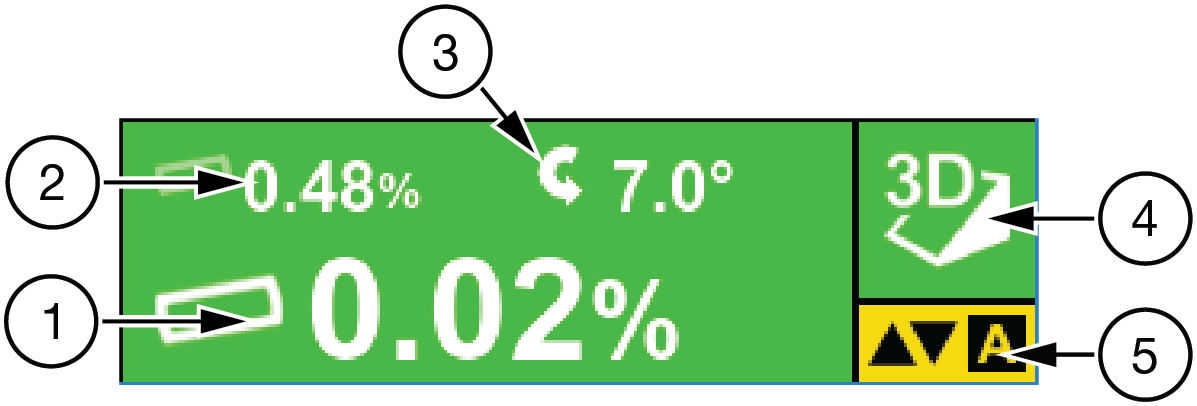
| 1 | Design cross slope | Current cross slope of the design surface, perpendicular to the dozer heading |
| 2 | Blade slope | Blade graphic on Slope Control button tilts depending on slope of design surface |
| 3 | Blade rotation | Current blade position as CW or CCW |
| 4 | Type of control | Indicates whether the 3D or 2D control is active |
| 5 | AUTO indicator | AUTO with yellow background indicates that automatic control is engaged. If AUTO shows in red letters with a line through it, the elevation is outside of parameters and the feature is unavailable |
| Slope Control button background | Background color indicates sensor status:
|
Previous:
GNSS information
Next:
Slope type and status
myTopcon NOW! support
Take your Topcon experience to the next level with myTopcon NOW! This platform is a self-service tool for your desktop or mobile device.





