Looking for your apps? Click the account icon in the upper right corner of the page.

Bluetooth/Wi-Fi antenna install

The Bluetooth antenna (P/N 1019330-01) includes a magnetic base for installation. The Bluetooth/Wi-Fi Antenna is used on systems with an MC-X1 controller that do not use or need a modem.
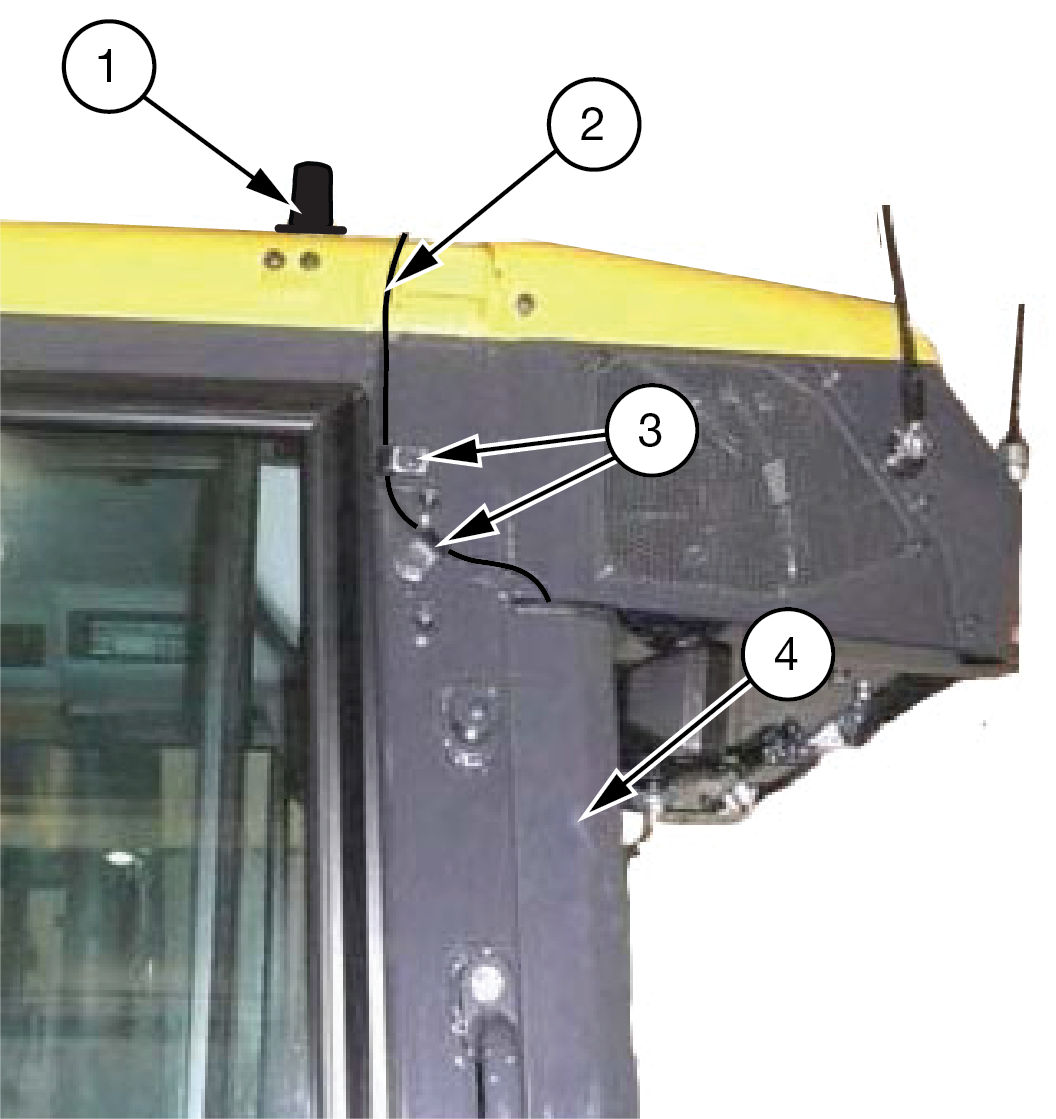
Figure: Bluetooth/Wi-Fi antenna
  1. Radio Antenna Base
  2. Antenna Cable
  3. P-Clamps
  4. Cable Route
  1. Install the radio antenna base (1) on the roof.
  2. Use P-clamps (3) to attach the radio antenna cable (2) to the available standoffs.
  3. Remove the harness cover.
  4. Run the cable along the harness and down into the battery compartment (4).
  5. Run the cable and the other roof-mounted component cables through the cable seal.
    ADDITIONAL INFORMATION:
    Caution:
    Antennas must be mounted as far away as possible from the GNSS receivers and other antennas. Refer to Location Guidelines for Supplemental Antennas.

myTopcon NOW! support

Take your Topcon experience to the next level with myTopcon NOW! This platform is a self-service tool for your desktop or mobile device. 

Product manuals
paper icon
Communications
phone icon
E-learning
hat icon
Quick start guides
support icon
Firmware & software updates
cloud icon
Troubleshooting
webinars icon





