
Display Units are applicable to the 3D-MC user interface. They are not applied when you create a machine file. They must be set in the Machine Builder wizard as the units of measure.
- Select to open the Display Units screen.
- Select the units on the Display Units screen, then select OK.ADDITIONAL INFORMATION: The selected units show on the display.
Figure: Display units 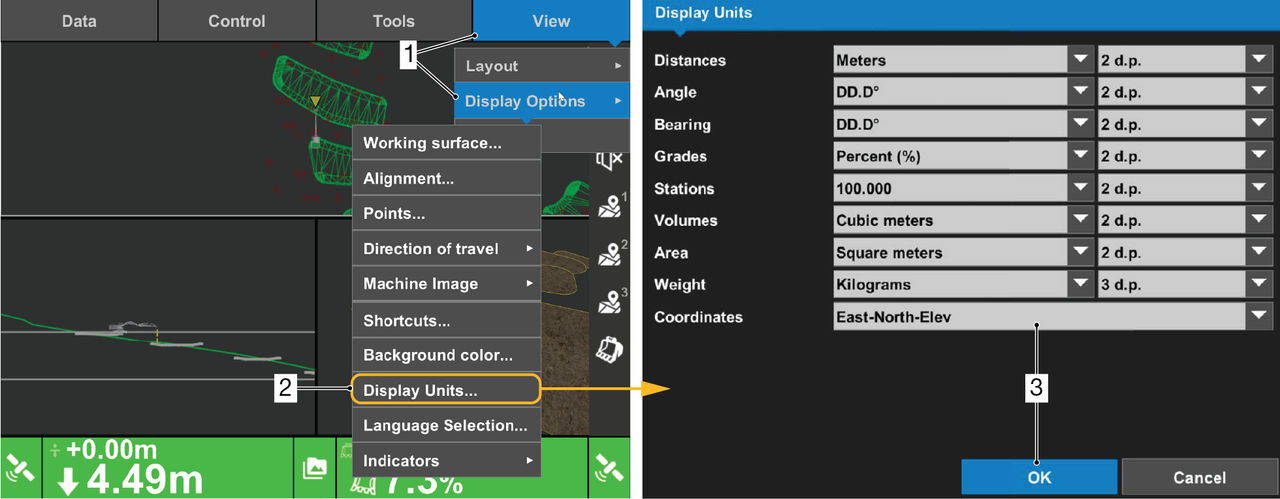
- Path to Display Units screen
- Display Units menu item
- Display unit options and OK control
Previous:
Background color
Next:
Language selection
myTopcon NOW! support
Take your Topcon experience to the next level with myTopcon NOW! This platform is a self-service tool for your desktop or mobile device.





