
Configure joystick buttons for 3D-MC operation. The buttons can do two functions and show feedback for the assigned function. This applies to Topcon, Engcon, Excidor, and Oilquick models.
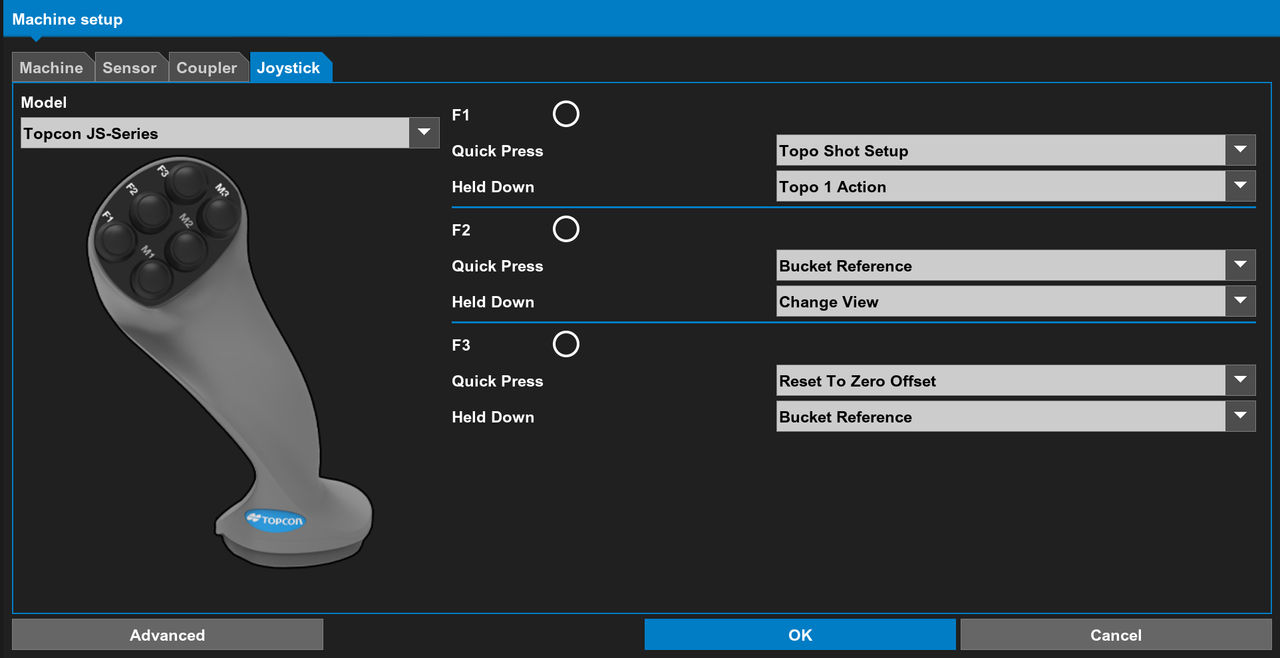
Select tab to configure buttons on OEM joysticks with 3D-MC operations. These include the Topcon JS-3 joystick (3 buttons), Engcon joystick (3 buttons), Excidor joystick (8 buttons), and Oilquick with Engcon joystick (3 buttons).
You can configure two operations per button: one for a fast push of the button and another when you push and hold the button down. 3D-MC has an interactive radio button that shows green when you push a button. This makes it easy to see the assignment of an operation to a button.
Previous:
Excavator orientation
Next:
Joystick configuration
myTopcon NOW! support
Take your Topcon experience to the next level with myTopcon NOW! This platform is a self-service tool for your desktop or mobile device.





