
You can select the layer settings for the point symbol and color. You can also show the point name, description, and elevation. You can select these settings for each layer.
- Select .ADDITIONAL INFORMATION:The Layer screen opens.
- Enter a Name.
- Select the Show Layer checkbox to show the layer.
- Select a Color.
- Select a Symbol for points.
- Select the Show point names checkbox to show the names of the points.
- Select the Show point descriptions checkbox to show the descriptions of the points.
- Select the Show point elevations checkbox to show the elevations of the points.
- Select OK.ADDITIONAL INFORMATION:
Figure: Layer settings 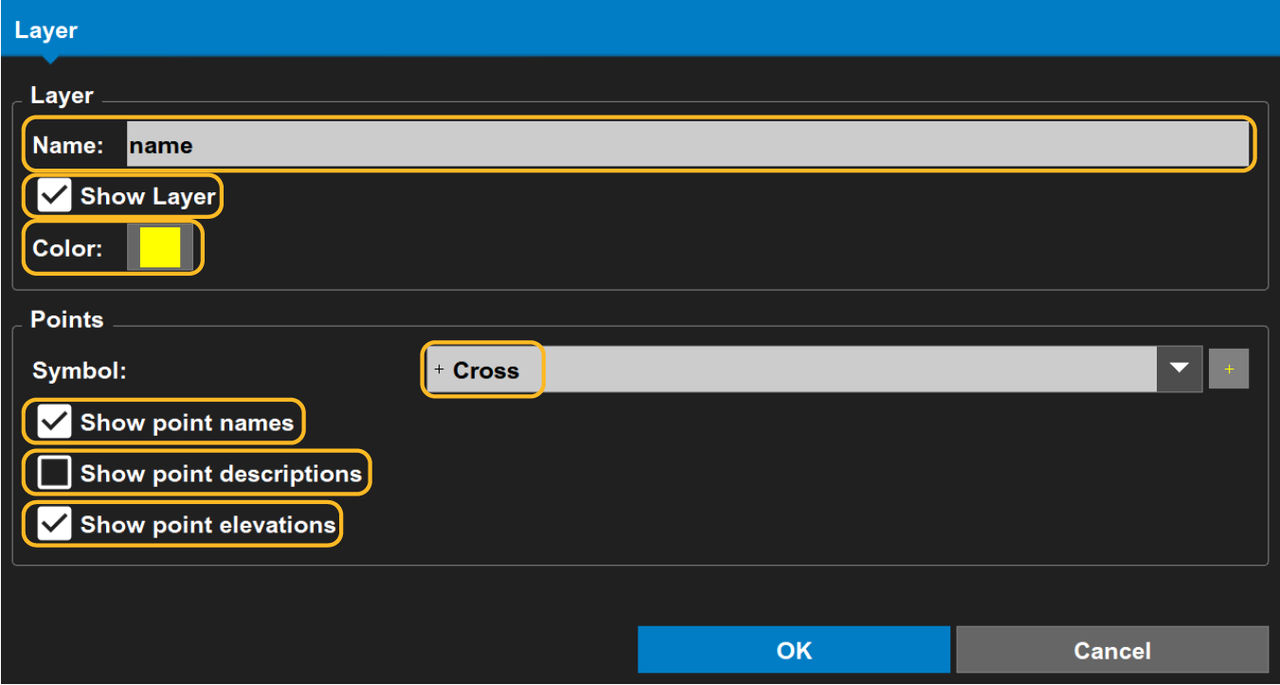 Caution:entries and generic point display settings overwrite layer settings.
Previous:
Project layers
Next:
Points and polylines
myTopcon NOW! support
Take your Topcon experience to the next level with myTopcon NOW! This platform is a self-service tool for your desktop or mobile device.





