
Open the Diagnostics menu to review sensor statuses that include IP4 lift/lower and IP2/IP8 hopper level sensors with their settings and descriptions.
Select the Technician menu, then select Diagnostics.
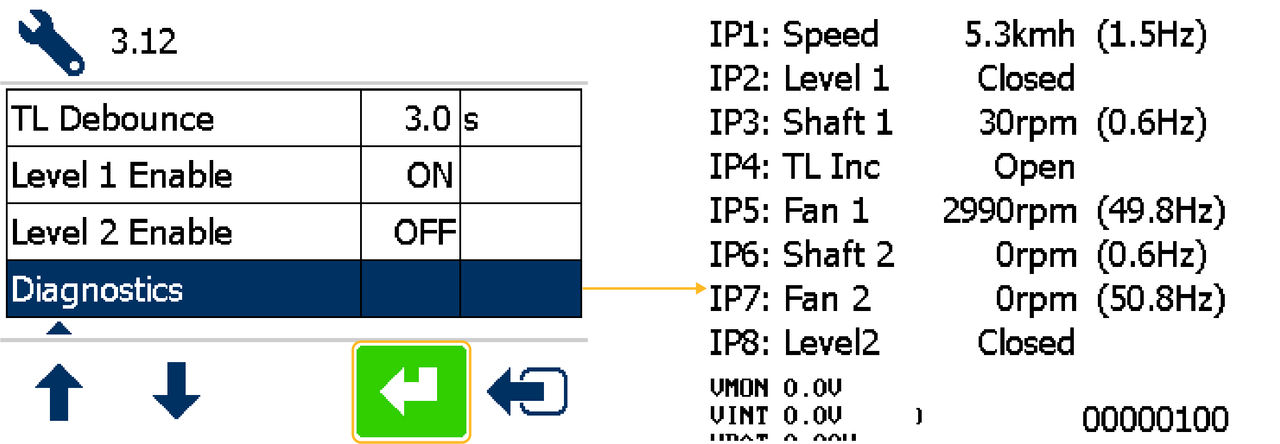
Input 4 (IP4) lift/lower sensor | ||
|---|---|---|
Setting | Description | |
Open | Drill lifted out of work | |
Closed | Drill lowered in work | |
Input 2 (IP2) and Input 8 (IP8) hopper level sensors | ||
|---|---|---|
Setting | Description | |
Open | Level sensor uncovered | |
Closed | Level sensor covered | |
Push any key to go back to the Setup menu.
Previous:
Eighteen bout tramlining rhythm
Next:
Legal information
myTopcon NOW! support
Take your Topcon experience to the next level with myTopcon NOW! This platform is a self-service tool for your desktop or mobile device.


