
Note: The Main receiver (yellow connector) is always installed on the left side of the machine from the operator’s seat.
- Identify the GNSS antenna cable with a yellow right-angle connector and put the cable into Connect the 1-Wire yellow cable (P/N 1041037-01) to the main GNSS the receiver on the left side of the machine from the operator’s seat.ADDITIONAL INFORMATION:
Figure: Generic GNSS cable routing 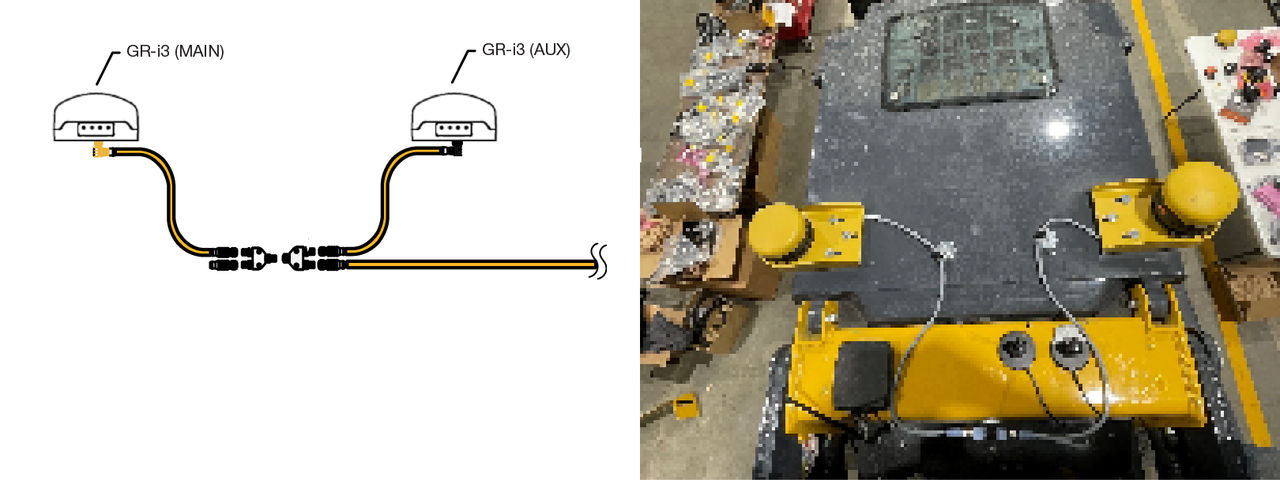
- Connect the other end of the GNSS cable to a tee connector.
- Connect a terminator to the other port of the tee.
- Connect a second tee to the first tee.
- Use zip ties to attach all cables that connect to the main GNSS receiver.
- Find the remaining GNSS antenna cable with the black right-angle connector and plug it into the auxiliary GNSS receiver. Connect the 1-Wire black cable (P/N 1041039-01) to the auxiliary GNSS receiver.
- Connect the other end of the cable to the tee.
- Connect one of the M12 extension cables to the other port on the tee.
- Carefully run the extension cable down through the rear of the machine and into the cab.
Previous:
GR-i3 dual GNSS receiver installation
Next:
Radio installation
myTopcon NOW! support
Take your Topcon experience to the next level with myTopcon NOW! This platform is a self-service tool for your desktop or mobile device.





