
The new myTopcon experience is now available. Please click here to access and start using all your apps. The legacy version will still be accessible until April 15th 2026.

Bench test validation

The benefit of a bench test validation is that the installer has all of the necessary components in correct operation with the latest applicable firmware and software. This prevents delays or machine down time for the installation.
Note: The necessary software and firmware for each device must be loaded in the order below. Update the software and firmware for each device as it is necessary.
Note:
Go to Topcon Support updates to check for newer versions of firmware or software.
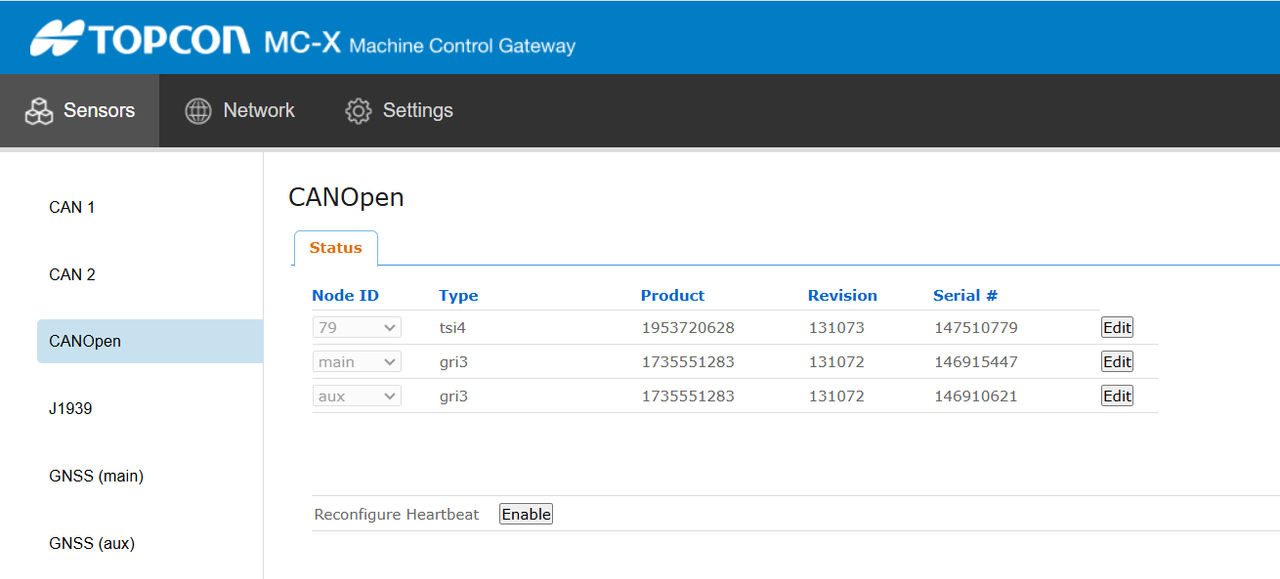
  1. Validate each component’s operational condition and software/firmware versions using the MC-X Web Interface.
  2. Update the firmware or software for each device if necessary. Components must appear on the CANOpen screen.
    ADDITIONAL INFORMATION:
    Figure: CANOpen screen
  3. After you make sure that all of the system components operate correctly and have the latest software and firmware, disconnect the components and return them to the kit boxes in the initial shipping boxes. Mark or label the boxes with the date of the satisfactory bench test.
    ADDITIONAL INFORMATION:
    Required firmware and software
    DeviceSoftware/Firmware
    GX-90
    3D-MC v15.5.1.25
    CT8X2
    3D-MC v15.5.1.29
    MC-X1 Controller
    v2.3.8 for MAX and MC-Mobile
    GR-i3/GR-i3F Main FW (bootloader)
    v3.00 or higher
    GR-i3/GR-i3F GNSS FW
    v5.5.2 or higher for B111 and B111A boards
    TS-i4 IMU Sensors
    v3.0.2
    GX-90
    TOS v1.0.5
    SL-25
    v1.12 or higher
    PS 200
    v16
    GT 1200
    v18
    GT 600
    v16
    LN-150
    v16
    LN160
    v1
    GX-90 MCX Configv1.0.0.0 or higher
    UR-1 Radio
    UR-1 Radio Boot Loader v2.0.9
    UR-1 Firmware v1.8.2
    2.2p4 (R2C)
    LSB-Series FWLSB110WCAN_Ver103
    GX9-90 Remote support clientRSC-0.1.2.1
    CT8X2 Remote support clientRSC-arm64_v8a-0.1.2.1
    Note: To upgrade 3D-MC from a previous build, remove the 3D-MC software before updating to the latest build.

myTopcon NOW! support

Take your Topcon experience to the next level with myTopcon NOW! This platform is a self-service tool for your desktop or mobile device. 

Product manuals
paper icon
Communications
phone icon
E-learning
hat icon
Quick start guides
support icon
Firmware & software updates
cloud icon
Troubleshooting
webinars icon





