
Current 3D-MC software supports the tilt rotator attachments from these manufacturers:
Each manufacturer has installation documentation for setup and calibration. Refer to the OEM installation manual for each attachment.- CAT (TRS)
- AMI
- Compacttilt
- Engcon
- Engcon2.0
- Excidor
- HKS
- Holp
- Liebherr
- MTS
- Nox
- Oilquick
- RotoTilt
- SMP
- Steelwrist
- SVAB
- Vemcon
- Generic CanOpen
- Generic J1939
The CAT TRS tilt rotator receives rotation information from the CAT CAN through the P/N 1037112-01, ASSY, CAT BUILD Grade Control XTR P/CAN ADPTR CBL. Thus, it is not necessary to connect directly to the Topcon P/N 1026213-02, ASSY, MC-X1 BREAKOUT B W/SL-25 harness CAN2 (J1939) connector.
For all brands except the CAT TRS, connect the Tilt Rotator attachment control unit to the Topcon P/N 1026213-02, ASSY, MC-X1 BREAKOUT B W/SL-25 harness CAN2 (J1939) connector in the figure.
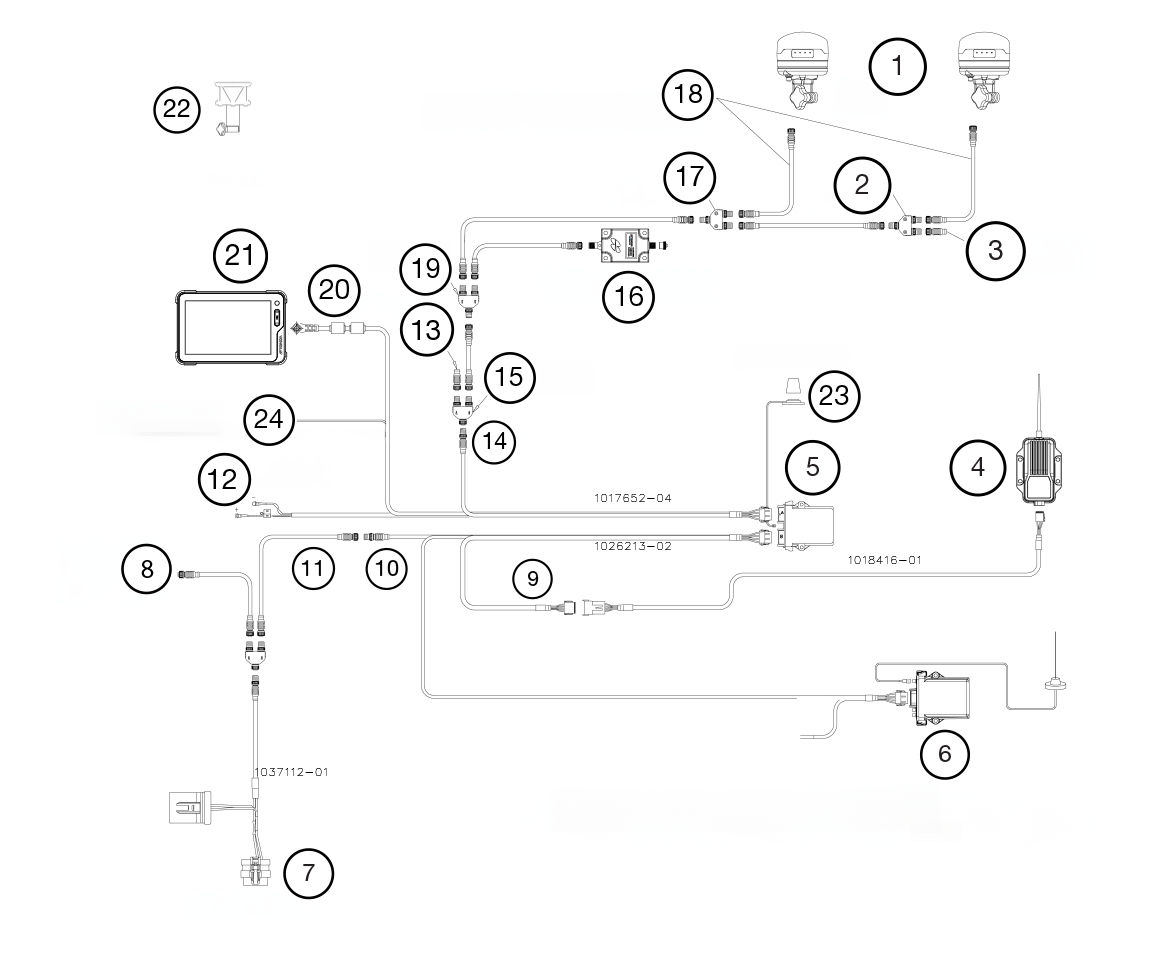
- GNSS Receiver
- 3020-0526 Tee
- 4060-0586 term resistor
- Radio
- MC-X1 Controller
- SL-25
- Machine interface connector
- To Tilt/Rotate control unit
- Serial
- J1939
- 9063-1167-XX M12 CAN cable
- Unswitched voltage supply
- 4060-0586 term resistor
- CANOpen
- 3020-0623 Tee
- TS-i4 Body Sensor for LPS configurations
- 3020-0623 tee
- One Wire Can Cable; Main Antenna Yellow; Aux Antenna Black
- 3020-0526 ree
- Loose cable to populate during installation
- GX-90
- A7 Prism
- Wi-Fi Antenna
- Ignition switched input
For more information about the tilt rotator attachment, refer to the Related Information.





