
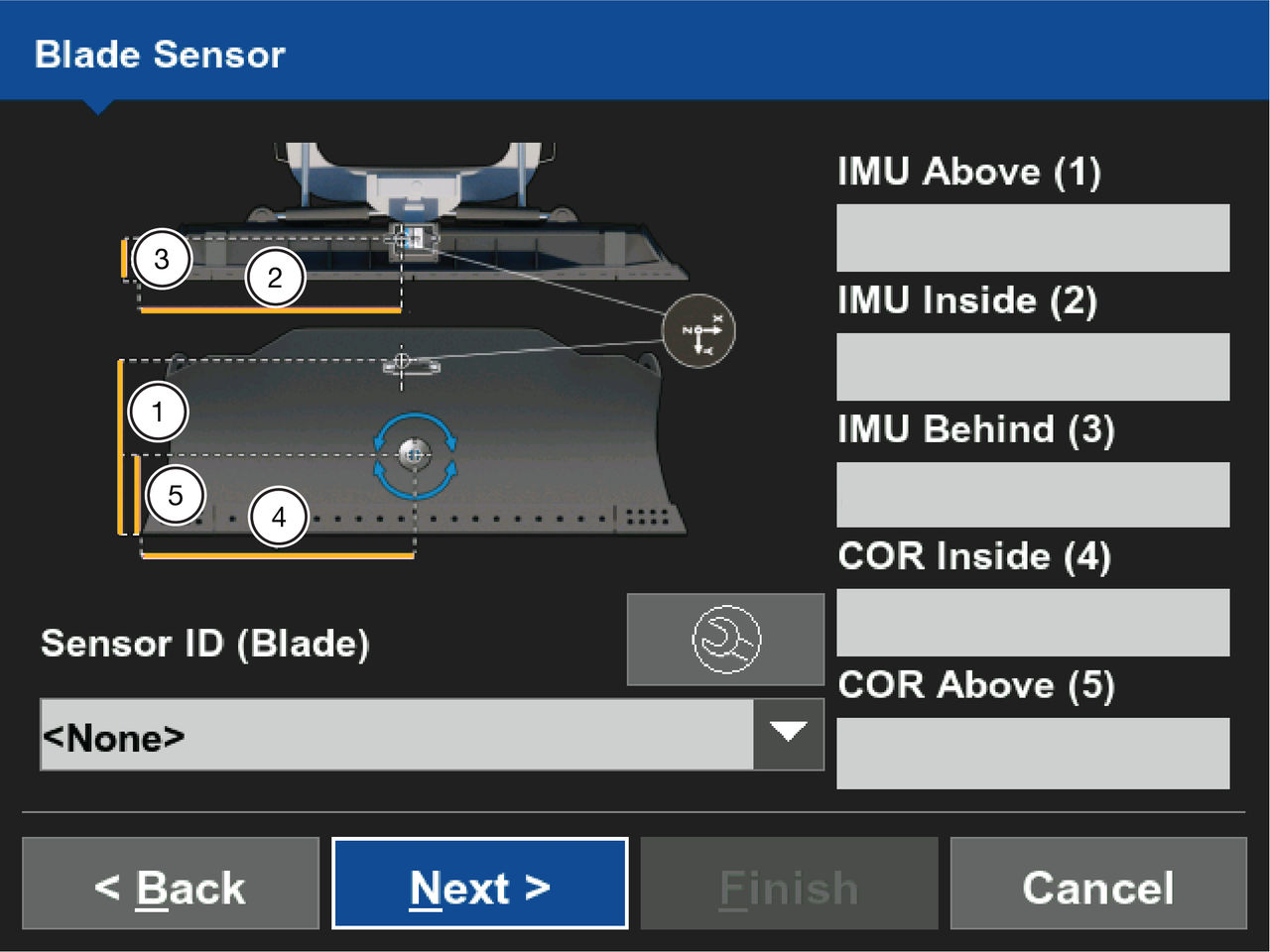
- Enter the measured distance from the cutting edge of the blade to the reference point on the TS-i4 Blade sensor in IMU Above(1) .
- Enter the measured distance from the reference point on the TS-i4 Blade sensor to the right side of the blade and enter it in IMU Inside(2) .
- Enter the measured distance from the reference point on the TS-i4 Blade sensor to the back of blade and enter it in IMU Behind(3).
- Enter the measured distance from the Blade COR to the right edge of the blade and enter the distance in COR Inside(4).
- Enter the measured distance from the Blade COR to the bottom of the cutting edge and enter the distance in the COR Above(5) text field.
- Select applicable sensor ID for the TS-i4 blade sensor from the Sensor ID (Blade) drop-down.
- Select
 to configure the TS-i4 Blade sensor node.ADDITIONAL INFORMATION:You must select the orientation to accurately show the label side and X-arrow direction of the TS-i4 blade sensor.
 - Select Next.
Previous:
Blade measurements
myTopcon NOW! support
Take your Topcon experience to the next level with myTopcon NOW! This platform is a self-service tool for your desktop or mobile device.





