
- Raise the machine blade so that both sides of the cutting edge rest a few inches above the ground.
- Select . The Valve Offsets screen appears.ADDITIONAL INFORMATION:
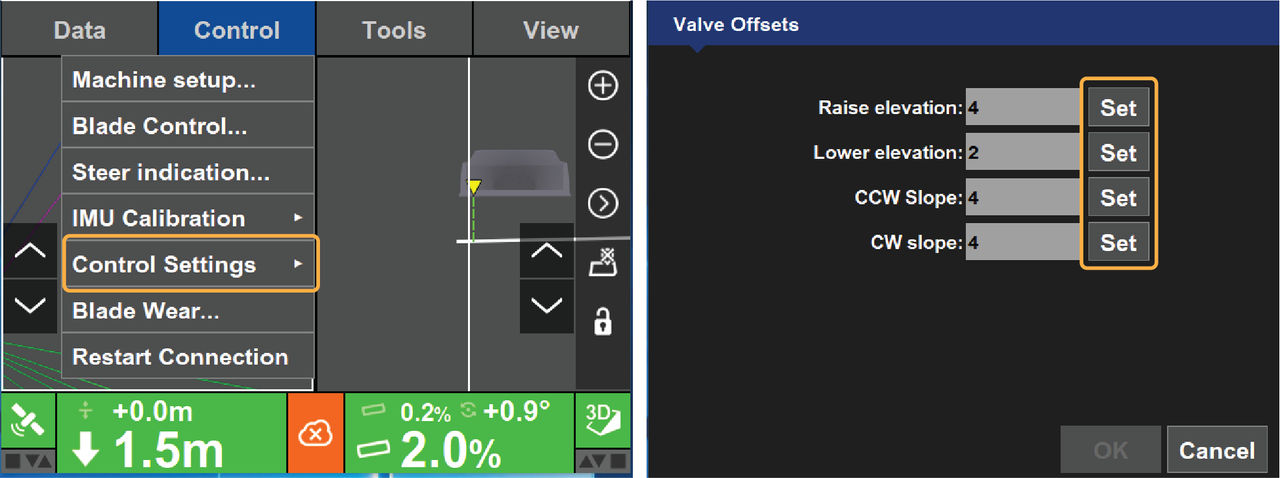
- Select Set on any Set entry box to activate the corresponding entry box.
- Select the up/down arrows to increase or decrease the valve offsets.ADDITIONAL INFORMATION: You can use the on-screen keyboard to enter values.
- Select OK to return to the 3D-MC main screen.
- Calibrate valve offsets before you adjust elevation and slope valve gains.ADDITIONAL INFORMATION:If you change the Valve Offset, do the Valve Gain calibration again.
Previous:
Valve offset and valve gain calibration
Next:
Advanced valve settings
myTopcon NOW! support
Take your Topcon experience to the next level with myTopcon NOW! This platform is a self-service tool for your desktop or mobile device.





