
- Move the machine to the applicable location, and set the blade on the ground.
- Select Measure Point for A.ADDITIONAL INFORMATION: 3D-MC measures a point.
- Move the machine to the next location.
- Select Measure Point for B.
- Enter a Grid interval to set the interval to the same length as the cutting edge to keep passes straight.
- Enter the necessary Crossfall grade.
- Select Finish.
- Select OK.ADDITIONAL INFORMATION:
Figure: Measure point A 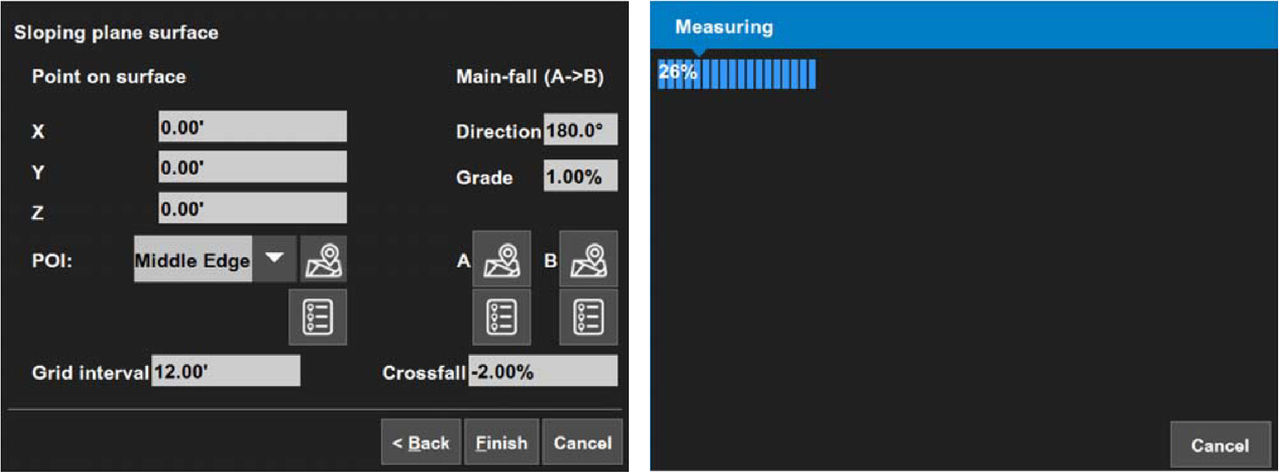
- Select Yes to set the new surface as active, or select No to make it inactive.ADDITIONAL INFORMATION:The main screen opens.
Previous:
Create a sloped plane surface
myTopcon NOW! support
Take your Topcon experience to the next level with myTopcon NOW! This platform is a self-service tool for your desktop or mobile device.





