
Configure fan speed alarm thresholds from the Alarms menu. This is not available when the fan speed calibration factor is zero.
- Select .ADDITIONAL INFORMATION:If necessary, select Fan1 Hi Spd Alarm, Fan2 Lo Spd Alarm, or Fan2 Hi Spd Alarm.
- Use the left/right arrows to set an alarm threshold.ADDITIONAL INFORMATION:Note:If a fan speed calibration factor (PPR) is set to zero, the corresponding alarm setting is not available.
Figure: Fan speed alarm setting 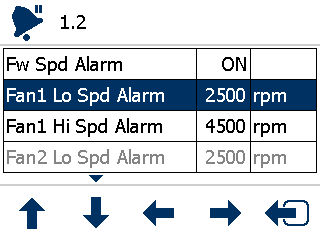
Previous:
Fan speed RPM display
myTopcon NOW! support
Take your Topcon experience to the next level with myTopcon NOW! This platform is a self-service tool for your desktop or mobile device.


