
Configure the PPR and calibration factor settings of the fan to make sure that RPM calculation is accurate. Adjust values for the sensor type and installation if necessary.
- Select .ADDITIONAL INFORMATION:Note:If it is necessary to monitor a second fan, Fan 2 PPR must be set to a minimum of 1.0.Note:The ppr value can be higher for some sensor installations.
- Set the calibration factor to a minimum of 1.0 pulses per revolution (PPR) for installations with a single magnet and reed switch sensor.ADDITIONAL INFORMATION:The pulses per revolution configuration both enables the function and lets it calculate the RPM correctly. If a sensor gets three pulses per revolution but is configured for one, then the calculated RPM shown is inaccurate by a factor of three.
Figure: Fan speed calibration factor 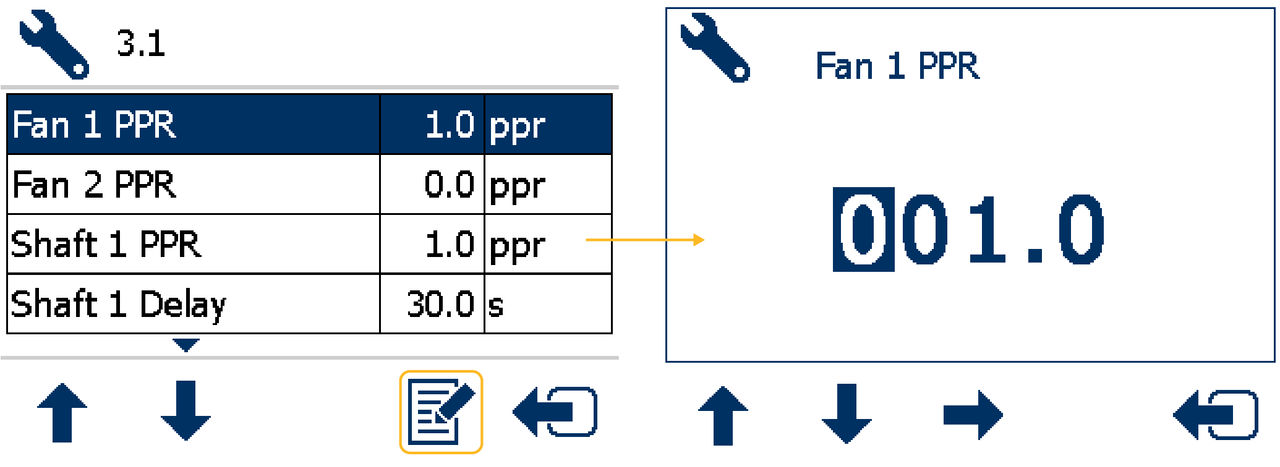
Previous:
Fan speed alarm configuration
Next:
Shaft speed RPM display
myTopcon NOW! support
Take your Topcon experience to the next level with myTopcon NOW! This platform is a self-service tool for your desktop or mobile device.


