
Configure the shaft delay time to prevent unnecessary alarms during low-speed drill operations and drilling speed settings adjustments.
It is necessary to run the drill at very low speeds for some crops (for example, oilseed rape (canola)). The seed shaft runs very slowly and the instrument can sense that the shaft stopped, which causes the shaft speed alarm. The configurable delay time prevents unnecessary alarms. When the drill runs at faster rates, a long time delay is also not applicable. In this case, you can configure a shorter delay time.
- Select .
- Select Edit
 .
. - Use the arrows to set the delay time.ADDITIONAL INFORMATION:The factory default is 30 seconds.
Figure: Shaft alarm delay time 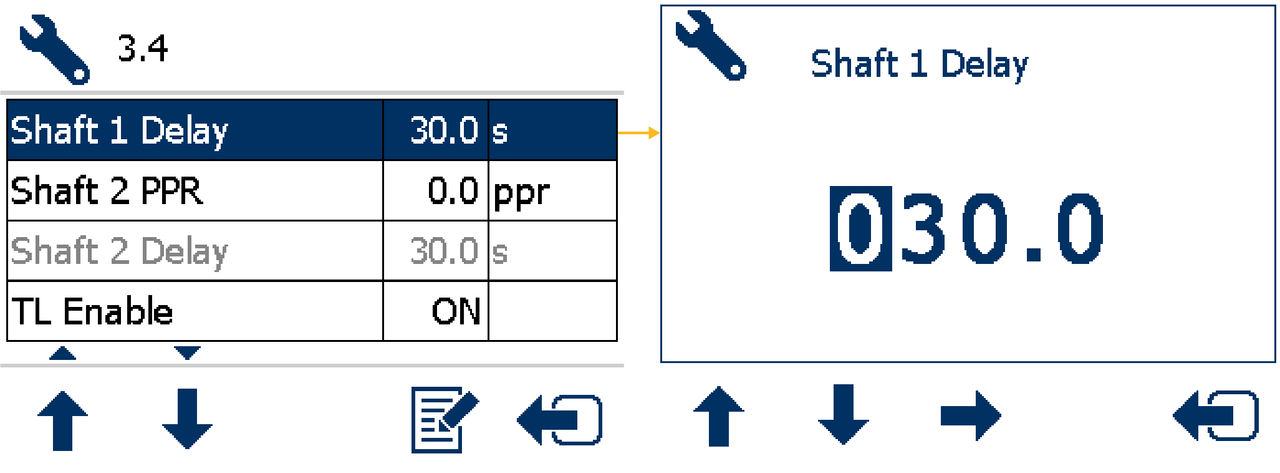
Next:
Hopper level alarm
myTopcon NOW! support
Take your Topcon experience to the next level with myTopcon NOW! This platform is a self-service tool for your desktop or mobile device.


