
The system calculates area and work time from speed and implement width, storage totals, and grand totals. You can change between Total 1 and Total 2.
The system calculates the Area  from the forward speed and the configured implement width. The system adds Area and Work Time
  to the total that is selected on the display (Total 1 or Total 2). The system only adds Area while the drill is in work. The system also adds Area and Work Time to the Grand Total memory register. Select
  to change between Total 1 and Total 2. Total 1 and Total 2 are the total values since the last reset.
from the forward speed and the configured implement width. The system adds Area and Work Time to the total that is selected on the display (Total 1 or Total 2). The system only adds Area while the drill is in work. The system also adds Area and Work Time to the Grand Total memory register. Select to change between Total 1 and Total 2. Total 1 and Total 2 are the total values since the last reset.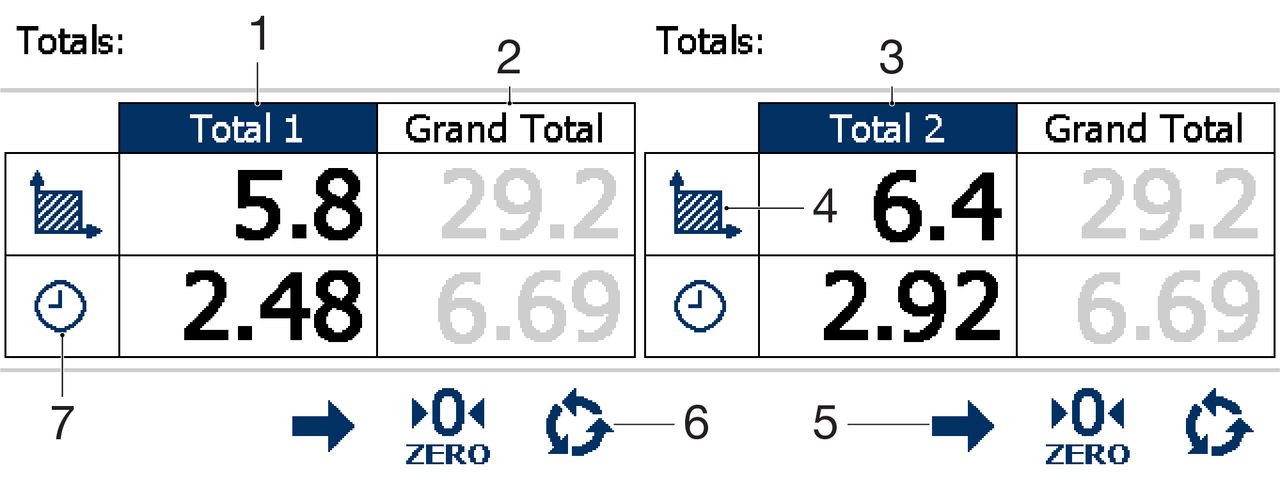
- Total 1
- Grand total
- Total 2
- Area
- Change panes
- Select
- Work time
Previous:
Hopper level alarm
Next:
Reset a part total
myTopcon NOW! support
Take your Topcon experience to the next level with myTopcon NOW! This platform is a self-service tool for your desktop or mobile device.


