Looking for your apps? Click the account icon in the upper right corner of the page.

Valve gains calibration

Make sure that engine and hydraulic temperatures are in the normal operating range.
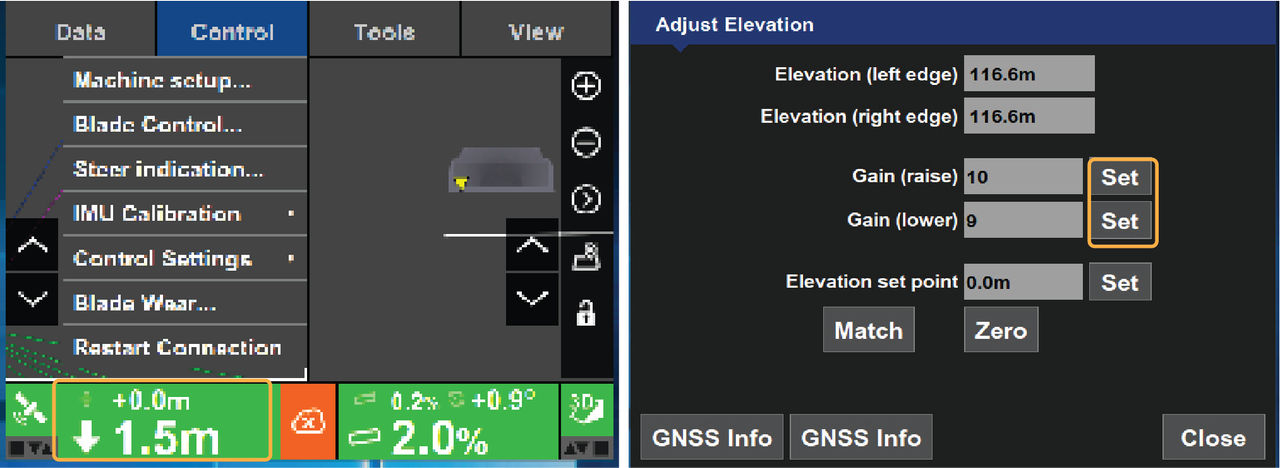
EnterGain values on the Adjust Elevation and Adjust Slope screens.

  1. Select Elevation Control.
    ADDITIONAL INFORMATION:
    The Adjust Elevation screen will appearshows.
  2. Select Set on either Gain Set entry box to activate the corresponding entry box.
  3. Select the up/down arrows to increase or decrease the Gain values.
    ADDITIONAL INFORMATION:
    You can use the on-screen keyboard to enter values.
  4. Select Close to return to the 3D-MC main screen.

myTopcon NOW! support

Take your Topcon experience to the next level with myTopcon NOW! This platform is a self-service tool for your desktop or mobile device. 

Product manuals
paper icon
Communications
phone icon
E-learning
hat icon
Quick start guides
support icon
Firmware & software updates
cloud icon
Troubleshooting
webinars icon